Building a Centralized Magic Link Auth for Payload CMS
Recently, I decided to migrate my personal website, aniketpatidar.com, from GitHub Pages to Payload CMS (hosted at cms.aniketpatidar.com).
Having previously worked with Sanity CMS, Payload felt immediately familiar. Setting up pages, layouts, and components was a breeze. For the infrastructure, I went all-in on the Cloudflare ecosystem, utilizing R2 for storage and D1 for my database needs.
The setup was incredibly straightforward, with only one minor gotcha: I hit the Cloudflare Workers 3 MB script size limit on the free tier. When you are bundling complex integrations or CMS dependencies into a single Worker script, that compressed size limit sneaks up on you quickly. A quick upgrade to the Workers Paid plan (which bumps the limit to 10 MB) resolved the deployment issues, and the site was live.
But once the site was up, I realized I had a different problem to solve: Authentication.
The Problem with Personal Website CMS Auth
When it comes to personal websites, the traditional CMS experience feels a bit too heavy. Website owners shouldn’t have to remember a specific Payload password or navigate to a completely separate CMS login screen just to fix a typo or publish a quick update.
The ideal workflow should be entirely frictionless: Open the website → Log in → Edit content → Save.
Building an “Invisible” Authentication Flow
To achieve this, I decided to build a reusable authentication flow based on magic links. Instead of building this directly into the website’s codebase, I centralized it using a Cloudflare Worker. This means I can reuse the exact same authentication service across multiple personal websites in the future, rather than rebuilding it from scratch every time.
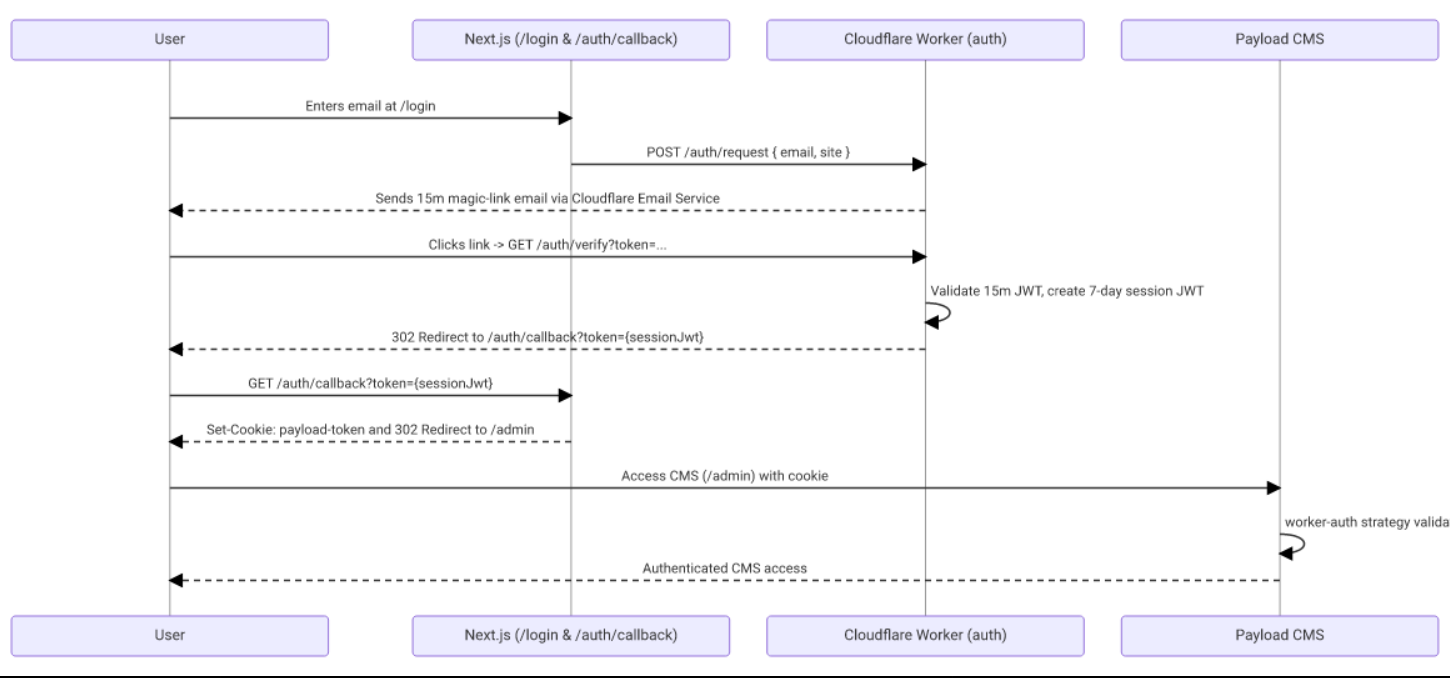
Here is exactly how the flow works:
- Initiation: The user enters their email on the
/loginpage of the website. - Request: The website sends this request to the centralized Cloudflare Worker.
- Token Generation: The worker generates a secure, short-lived magic link token.
- Delivery: The magic link is emailed to the user.
- Validation: When the user clicks the link, the worker validates the token.
- Session Creation: Upon successful validation, the worker creates a JWT session with a 7-day lifetime.
- Redirection: The user is redirected back to the website.
- Storage: The session is securely stored in an HTTP-only cookie.
- Access Granted: Payload CMS validates the session from the cookie and grants access to the dashboard.
The End Goal
The goal of this project wasn’t to build another complicated authentication system. It was the exact opposite: to make the CMS experience feel completely invisible for people who just want to manage their personal websites without the overhead.
If you are interested in seeing how it all comes together under the hood, I’ve made the source code available here: github.com/aniketpatidar/personalwebsite